
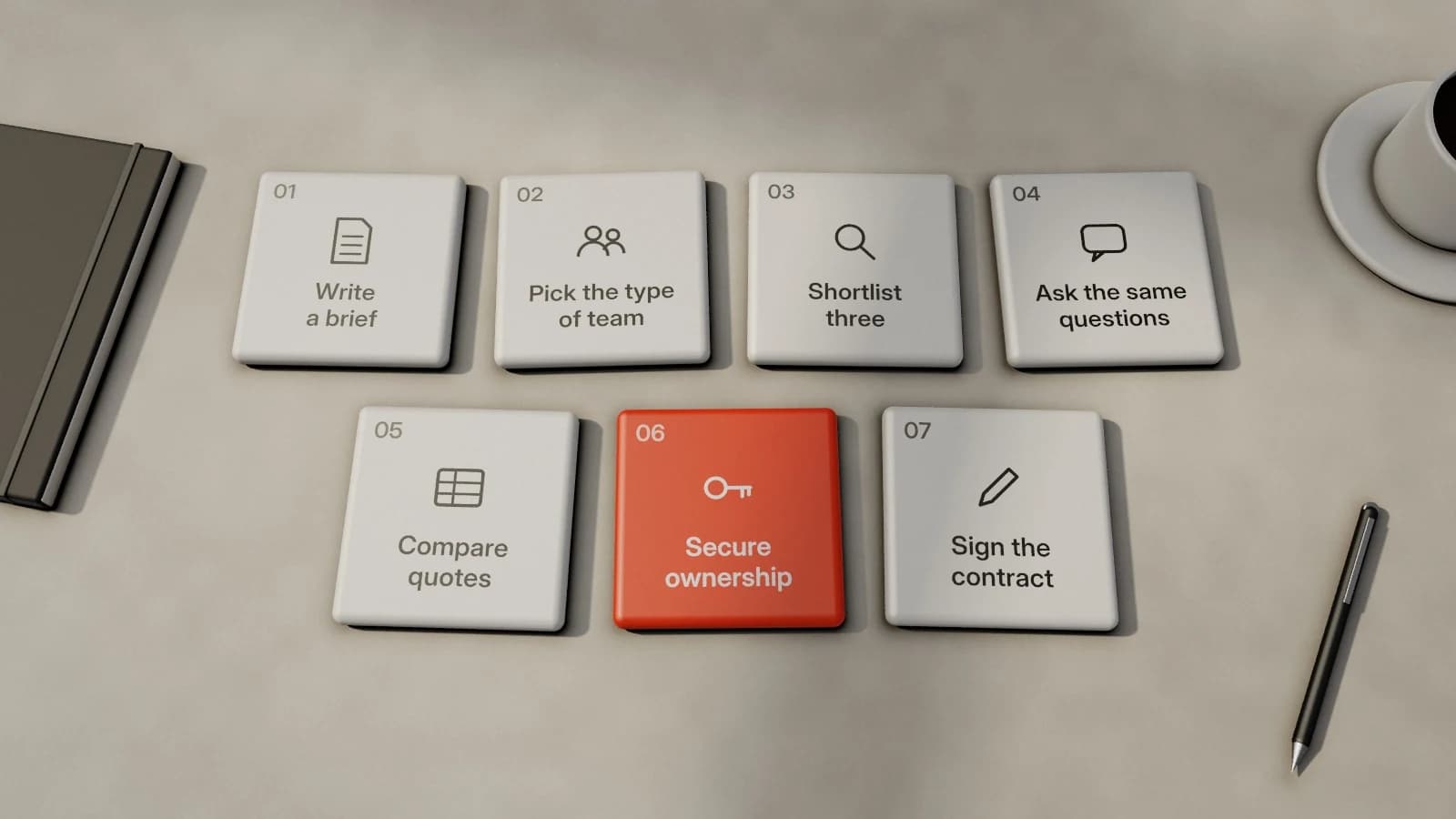
To hire a web development company, write a one-page brief, shortlist three teams with work like yours, and ask each the same questions. Then compare written quotes line by line and confirm you will own the code, domain and hosting. Start with a small paid milestone, and sign a contract that covers scope, payment, ownership and support.
That is the whole process in one paragraph. The rest of this guide is the detail that makes it work: the questions that separate good teams from risky ones, the contract terms that protect you, and what to do if a project has already gone wrong. We wrote it from the other side of the table. A lot of our work starts with a business bringing us a website another developer left unfinished, slow, or locked away from them, and the same mistakes come up again and again.
Key takeaways
- Choose on evidence, not price: live sites like yours, reviews from named clients, and a written quote that lists exactly what you get.
- Own everything from day one: the domain is registered in your name, the hosting account is yours, and the code sits in a repository you control.
- Paying for code does not automatically make it yours. Your contract needs a written transfer of copyright.
- Split payment into stages tied to work you can see, such as 50% before work starts and 50% on delivery, or milestones on larger builds.
- Offshore teams can work well when their hours overlap with yours and every decision is written down.
Why hiring a web developer goes wrong
Most failed web projects do not fail because the developer could not code. They fail because of something nobody wrote down. These are the four problems we see most often when a business asks us to take over a site:
- 1.You cannot get into your own website. The domain, hosting or admin login is registered to the developer, and the developer has stopped replying.
- 2.Nobody agreed on what “done” means. The quote said “five-page website”, the client expected a booking system, and both sides feel cheated.
- 3.The site works but hurts the business. It loads slowly on phones, ranks for nothing, and every text change needs a paid developer.
- 4.Support ends at launch. A plugin update breaks the contact form two weeks later, and there is no one to call.
Every step below exists to prevent one of these four.
Step 1: Write a one-page project brief
A brief is the cheapest insurance you will buy. It forces you to decide what you want before anyone quotes, and it means every company you contact is pricing the same project.
Keep it to one page and cover:
- The goal: what the website must achieve in numbers you can check. For example, “take bookings online” or “cut support emails by showing order status”.
- Who it is for: your customers, where they are, and what device they mostly use.
- Pages and features: the pages you need, plus features such as payments, logins, a blog, multiple languages, or connections to tools you already use (CRM, booking system, Moodle).
- Content: who writes the text and supplies the photos. Missing content delays more launches than code does.
- Examples: two or three sites you like, and what you like about each.
- Timeline and budget range: a real deadline if you have one, and the range you can spend. A range gets you honest proposals instead of guesses.
- Who decides: the one person who approves designs and signs off work.
If you are unsure what drives the price, read what affects the cost of a website before you set your range. Or answer five questions in our project planner to see the scope and typical timeline for a project like yours.
Step 2: Freelancer, agency or offshore development company?
All three can be the right choice. The wrong choice is picking one without knowing the trade-offs.
| Freelancer | Local agency | Offshore development company | |
|---|---|---|---|
| Best for | Small, well-defined sites | Projects that need in-person workshops | Full builds where you want a team at a sensible cost |
| Range of skills | One person’s skills | Design, development, SEO in one place | Design, development, SEO in one place |
| Main risk | Single point of failure if they get busy or disappear | Higher cost for the same work | Time zones, communication and accountability |
| What to check | Reviews, availability, a backup plan | What you pay for beyond the build | Working hours overlap, written process, payment protection |
If you decide to outsource web development to a team in another country, the questions in Step 4 and the section on making an offshore team work matter most. Distance is rarely the problem. Silence is.
Step 3: How to choose a web development company for your shortlist
Aim for three serious candidates. More than five and you will compare sales pitches instead of evidence.
Good places to look:
- Referrals: from businesses you trust, especially ones in your industry.
- Review platforms: Clutch, Google Business Profiles, and freelance marketplaces such as Fiverr and Upwork, where reviews come from verified, paying clients.
- The credits on sites you admire: many sites name their builder in the footer.
Then check each candidate the same way:
- 1.Look at live work, not screenshots. Open three sites from their portfolio on your phone. Do they load quickly? Can you find what you need in two taps?
- 2.Measure their sites. Paste a portfolio URL into Google’s PageSpeed Insights, or put it side by side with another site in our website speed and SEO comparison. Google’s Core Web Vitals treat a page as good when the main content appears within 2.5 seconds, the page reacts to taps within 200 milliseconds, and the layout barely shifts (a score of 0.1 or less).
- 3.Read reviews for patterns. One glowing review proves little. Ten reviews that mention clear communication, patience and finishing the details tell you how the team behaves when things get hard.
- 4.Find work like yours. A team that builds online stores every week will spot problems in your checkout that a generalist will not.

Step 4: 15 questions to ask a web developer before hiring
Ask every company on your shortlist the same questions, in writing, so you can compare answers side by side. The answer matters less than how specific it is. Vague answers now become vague work later.
About their work and fit
1. Can you show me two or three live projects similar to mine, and what you did on each?
A good answer names the project, the problem, the team’s role and the result. “We built the whole site” is weaker than “we rebuilt the checkout and moved them from WooCommerce to a custom Next.js store”.
2. Who will work on my project, and will that change?
You want to know whether the person in the sales call is the person who writes the code, and what happens if someone leaves.
3. What would you do differently from my brief?
Strong teams push back on something. If they agree with everything, they have not read it closely.
About process and communication
4. What happens between signing and launch, step by step?
Look for a defined sequence (discovery, design, build, testing, launch) and for points where you approve work before the next stage starts.
5. How and when will we communicate, and what hours overlap with mine?
Get specific tools (email, WhatsApp, Slack, video calls) and specific hours. “We’re always available” is not an answer.
6. How do you handle a change I ask for halfway through?
A professional answer: you describe the change, they tell you in writing what it costs and how it moves the deadline, and nothing is built until you approve.
7. Where can I see progress before launch?
You should get a private staging link where you can click through the real site as it is built, not only screenshots.
About quality
8. How do you test before launch?
Listen for real devices and browsers, form and payment testing, and speed checks with tools such as Lighthouse.
9. How do you make the site fast, findable and accessible?
Ask for specifics: image optimization, caching, page titles and descriptions, clean URLs, and accessibility against WCAG 2.2, the current international standard.
10. How do you handle my customers’ personal data?
If the site collects names, emails or payments from people in the UK or EU, your developer may act as a data processor on your behalf. The UK regulator explains what a contract with a processor needs to include.
About ownership and access
11. Whose name will the domain and hosting be registered in?
The only right answer is yours.
12. Will I own the code, design and content when the project is paid for, and will the contract say so?
See Step 6 for why this needs to be in writing.
13. Which paid themes, plugins or services will the site depend on, and who holds those licenses?
A site built on a premium theme licensed to the developer can stop receiving updates the day you part ways.
About after launch
14. What support is included after launch, and for how long?
A good team fixes its own bugs for a defined period after launch at no extra cost, and tells you what counts as a bug versus a new request.
15. If we stop working together, what do I get?
You want a clear handover: every login, the code repository, a backup, and a short explanation of how the site is put together.
Google gives similar advice when hiring for search. Its guide on whether you need an SEO suggests asking for examples of past work, how results will be measured, and whether every change will be shared with you. The same standard applies to anyone who builds your website.
Step 5: How to compare website quotes
Quotes for the same brief can differ several times over. Usually that is not greed or desperation. The companies are pricing different projects. Put every quote into one table before you compare prices.
| What to check | Quote A | Quote B | Quote C |
|---|---|---|---|
| Pages and features listed by name | |||
| Design included (custom or template) | |||
| Content writing or migration included | |||
| Testing and speed checks described | |||
| SEO basics included (titles, sitemap, redirects) | |||
| Number of revision rounds | |||
| Timeline with dates for each stage | |||
| Payment schedule | |||
| Support period after launch | |||
| You own domain, hosting and code | |||
| Ongoing costs (hosting, licenses, maintenance) |
A cheap quote with half the rows empty is not cheaper. It is the same project with the expensive parts moved to later invoices. A higher quote that fills every row is often the lower total cost.
Be wary of any quote you cannot hold someone to. A professional quote is written, itemized and dated, and it tells you what is not included as clearly as what is.
Step 6: Who owns the website code? Get ownership in writing
This is the step most buyers skip, and the one that causes the most expensive problems.
The domain. Your domain belongs to whoever is listed as the registrant with the registrar. Check yours with ICANN’s free registration data lookup. ICANN’s guide for registrants explains your rights over transfers and renewals. If a developer registers the domain for you, it should be in your name and your company’s email.
The hosting. Open the hosting account in your name, with your payment card, and add the developer as a user. If they need to set it up, ask for the account to be transferred to you at launch.
The code. Many buyers assume that paying for a website means owning it. In the United States, that is not automatic. Under copyright law, work by an outside contractor only counts as “work made for hire” when it falls into one of nine narrow categories and both sides sign an agreement saying so. Software and website code are not on that list. The U.S. Copyright Office explains this in Circular 30. In practice, your contract needs a clause that assigns the copyright in the code, design and content to you, usually once the final payment is made. Other countries have their own rules, so have a lawyer review the contract for a large project. This guide is not legal advice.
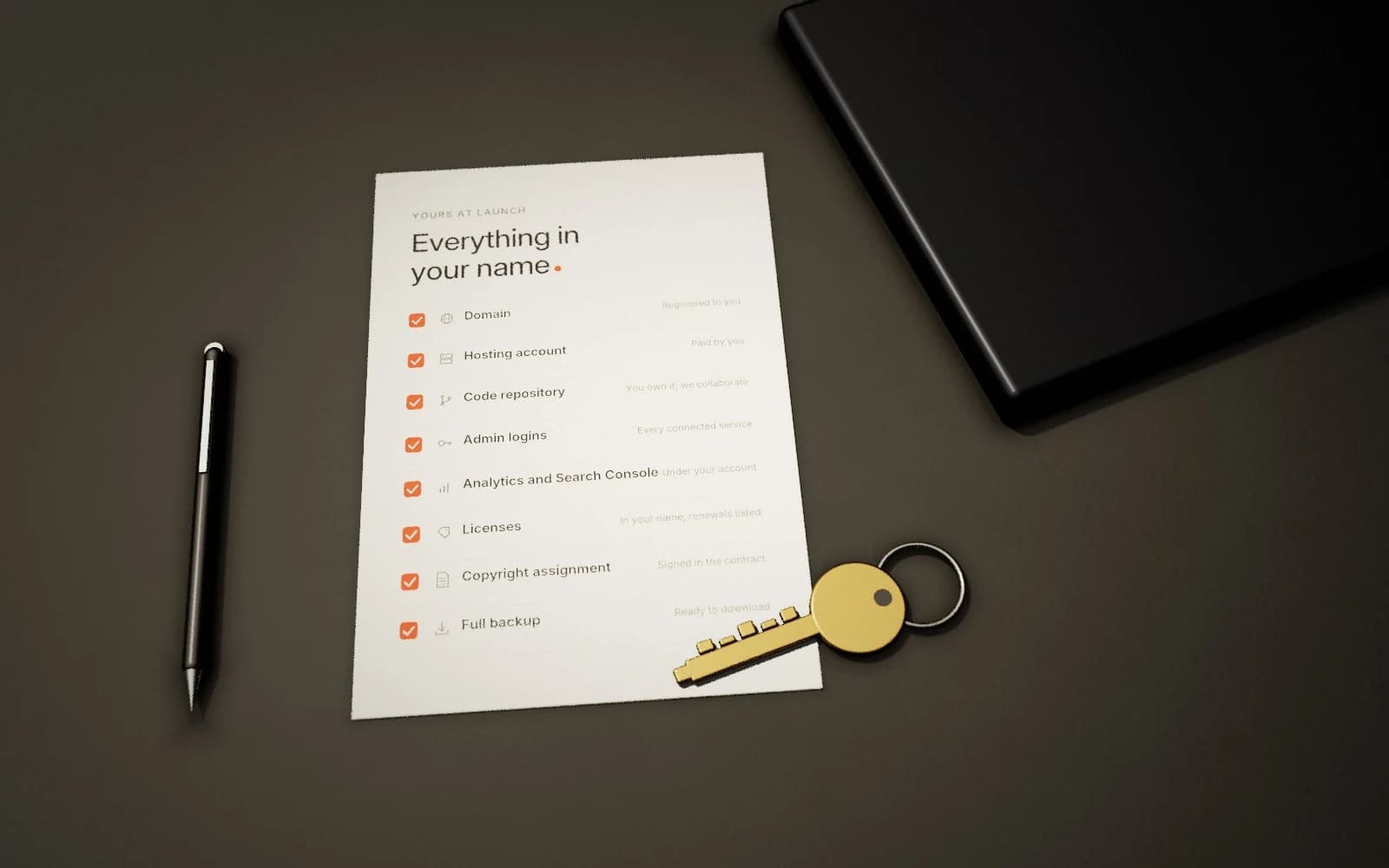
Your ownership checklist at launch:
- Domain registered in your name, with your email as the registrant contact
- Hosting account in your name, paid by you
- Code in a Git repository (GitHub, GitLab or Bitbucket) that you own, with the developer as a collaborator
- Administrator logins for the website, the hosting and every connected service
- Google Analytics and Google Search Console set up under your account
- Theme and plugin licenses in your name, or listed with renewal dates
- A written copyright assignment in the contract
- A full backup you can download
Sharing logins is part of every project. Avoid sending passwords by plain email or chat. Use your password manager’s sharing feature, or a secure method your developer provides. Clients send us access through Secure share, which encrypts the details on your device before they leave it.
Step 7: Your web development contract checklist
A contract does not need to be long. It needs to answer every question that could become an argument. Before you sign, check that it covers:
- Scope: the pages, features and integrations, named one by one, plus what is excluded.
- Deliverables and acceptance: how you approve each stage, and what happens if something does not work as agreed.
- Timeline: dates for each stage, and what moves them, including your own delays in sending content or feedback.
- Payment: the amounts, when each is due, and what triggers it. Paying in stages tied to visible progress protects both sides.
- Changes: how new requests are priced and approved before work starts.
- Ownership: copyright assignment for code, design and content, and confirmation that the domain, hosting and accounts belong to you.
- Third-party costs: hosting, licenses, paid plugins and APIs, and who pays them.
- Data protection: confidentiality, and processor terms if the developer will handle your customers’ personal data.
- Support: the bug-fix period after launch, and the terms of ongoing maintenance if you want it.
- Ending the contract: notice period, payment for work done, and a full handover of files and access.
Web development company red flags
Walk away, or ask much harder questions, if you see any of these:
- A price before they have asked about your goals, content or features
- No written quote, or a quote with a single total and no line items
- They want 100% of the payment upfront for a new relationship
- They plan to register your domain or hosting in their own name
- Portfolio links that are broken, slow, or “under NDA” for every project
- Reviews only on their own website, with no names or sources
- Promises of first-page Google rankings by a date
- No staging link: you will see the site only when it is “finished”
- No mention of testing, backups or support after launch
- Pressure to sign this week to keep a discount
Making an offshore team work
Hiring an offshore web development company can give you a full team (design, development, SEO and support) for what one local senior developer would cost. It works when you manage the three real risks: time, communication and trust.
Time zones. Ask for the team’s working hours in your time zone, and check the overlap. Two to four shared hours a day is enough for most projects if decisions are written down. Our team is in Islamabad, and we are available 9am to 1am Pakistan time. That covers the full UK and European workday, the US East Coast until mid-afternoon and US West Coast mornings.
Communication. Agree on one channel for decisions and one for urgent issues. On long projects, a shared Slack channel keeps everything searchable. Insist on a written summary after every call. A team that writes things down is a team you can hold to its word.
Trust and payment. Start with a smaller paid stage, such as discovery and design, before committing to the whole build. If you are hiring through a marketplace such as Fiverr or Upwork, the platform holds your payment until you approve the delivery. When paying directly, pay in stages linked to work you can see on the staging site.
“He understood our needs very well and applied the changes quickly.”
INISEG, an international education institution in Spain, has worked with our team across fifteen connected projects, from a branded Moodle 5.2 campus to live classes with attendance tracking. The INISEG case study shows how a long-term remote partnership works in practice.
Web developer disappeared? A 48-hour rescue plan
If your developer has stopped replying, act in this order. Speed matters most with the domain, because an expired domain can be lost.
- 1.Find your domain’s registrar and expiry date. Search the domain in ICANN Lookup. If it is close to expiring, contact the registrar today and prove that you are the business behind it.
- 2.Get into your hosting account. If it is in your name, reset the password. If it is in the developer’s name, contact the host. Hosts can often help when you can prove the website is yours with invoices, business records and email history.
- 3.Download a full backup of files and database the moment you have access.
- 4.Change every password the developer knew: hosting, website admin, email, payment gateway and analytics. Remove their user accounts.
- 5.Collect the paper trail. Contracts, invoices and messages show what you paid for and what you are owed.
- 6.Get an audit before you spend more. A new team should check the code, plugins and security before adding features. Rushing new work onto a broken base costs more later.
If you need help with any of these steps, we take over WordPress, Shopify, Next.js and Moodle projects that another team started. Tell us what happened and we will reply with what we would check first.
How we work at StackStead
We are a web and software development company in Islamabad, Pakistan, working with businesses and institutions in more than 20 countries. Since 2020 we have delivered 150+ projects for 80+ clients, and we are rated 4.9 out of 5 from 70 reviews on Fiverr. Here is how the advice above looks in our own process:
- A written quote before any work starts: with the scope, timeline and what is included. We do not publish prices, because an honest number depends on your brief.
- 50% before work starts and 50% on delivery, with the site on a staging link so you see progress the whole way.
- Every project includes requirements analysis, design, development, testing and one month of bug fixes and minor changes after launch.
- Most websites launch in under three weeks, and web applications in about four weeks.
- After the first month, website maintenance plans keep your site updated, backed up and improving, with dedicated developer hours if you need them.
See what we build on our web development services page, read verified client reviews, or book a call to talk your project through.
Frequently asked questions
How long does it take to hire a web development company?
Allow one to two weeks. Spend a day on your brief, two or three days finding a shortlist, and about a week collecting and comparing written quotes. Rushing this stage is the most common cause of expensive rework, so it pays to wait a few extra days for clear answers.
Should I pay a web developer upfront?
Paying part upfront is normal and fair, because the team is reserving time for you. Avoid paying everything before work starts. A common structure is 50% before work begins and 50% on delivery, or stage payments on larger projects, each released when you can see the finished work.
Who owns the website code, me or the developer?
It depends on your contract. In the United States, paying an outside contractor does not automatically transfer copyright in code. You need a written assignment, usually effective on final payment. Make sure the domain and hosting are also registered in your name. For a large project, ask a lawyer to check the terms.
Is it safe to outsource web development to another country?
Yes, when you manage the risks. Check reviews from named clients, confirm the team’s working hours overlap with yours, keep every decision in writing, and pay in stages tied to work you can see. Owning your domain, hosting and code keeps you in control wherever the team is based.
What should a web development contract include?
Scope, deliverables, timeline, payment schedule, how changes are approved, copyright assignment, third-party costs, data protection, support after launch, and how either side can end the agreement. Each of these answers a question that would otherwise become a dispute, so leave none of them to a verbal promise.
How many quotes should I get for a website?
Three is the right number for most projects. Fewer gives you no real comparison, and more than five tends to bury you in sales pitches. Send all three companies the same brief and the same questions, so the quotes describe the same project and differ only in approach and price.
What are the biggest red flags when hiring a web developer?
A price before any questions, no itemized written quote, a demand for full payment upfront, plans to register your domain in their name, no staging site, no testing or support after launch, and guaranteed Google rankings. Any one of these is a reason to ask harder questions.
Can I switch web developers in the middle of a project?
Yes, if you control your domain, hosting and code. Before switching, download a full backup, collect every login, and ask the new team to audit the existing work before building on it. Pay the outgoing developer for completed stages so the handover stays cooperative.
 Written byMuhammad AhmadFounder & Software Engineer at StackStead Solutions. Building for the web since 2020.Ask a question