
Of the 1,000 most-installed plugins on WordPress.org, 81 (8.1%) fail basic upkeep checks: 37 haven’t been updated in over two years and 43 aren’t tested with any of the last three WordPress releases. Together they run on at least 10.2 million sites. Most popular plugins are well kept, but the risk sits in plugins with 10,000 to 100,000 installs.
Outdated plugins are one of the most common ways WordPress sites get into trouble, so we wanted real numbers rather than guesses. On November 23, 2026 we pulled the public WordPress.org listing of the 1,000 most-installed plugins, out of 75,964 in the directory, and judged each one with the same rules our free WordPress plugin checker uses. The current WordPress release was 7.1.5.
Key findings
- 8.1% of the top 1,000 plugins need attention: 37 are abandoned (no update in over two years), 43 are untested (three or more WordPress releases behind) and 1 is stale (no update in over a year).
- Those 81 plugins run on at least 10.2 million sites. The 37 abandoned ones alone are on at least 2.5 million.
- 76.2% were updated in the last 90 days, and 77.2% are tested with the current WordPress version. The most popular plugins are mostly well maintained.
- Risk grows as installs fall: 3.0% of plugins with a million-plus installs need attention, against 10.9% of those with 10,000 to 100,000.
- Abandoned and untested plugins rarely answer support: for both, the median share of support threads resolved in the last two months is 0%, against 70.2% for healthy plugins.
- Only 5.7% require PHP 8 or newer, and 20.1% still declare a minimum older than PHP 7.0.
How plugin health changes with install count
| Active installs | Plugins | Healthy | Untested | Abandoned | Need attention |
|---|---|---|---|---|---|
| 1 million or more | 67 | 65 | 2 | 0 | 3.0% |
| 100,000 to 1 million | 391 | 371 | 14 | 5 | 5.1% |
| 10,000 to 100,000 | 542 | 483 | 27 | 32 | 10.9% |
| All 1,000 | 1,000 | 919 | 43 | 37 | 8.1% |
The one stale plugin is Hello Dolly, the sample plugin that ships with WordPress, in the 100,000 to 1 million band. Every plugin in the top 1,000 has at least 10,000 installs.
The most-installed plugins not updated in two years
| Plugin | Active installs | Last updated | Tested up to |
|---|---|---|---|
| Limit Login Attempts | 200,000+ | April 2023 | 6.2 |
| Health Check & Troubleshooting | 200,000+ | July 2024 | 6.6 |
| Layout Grid Block | 200,000+ | July 2023 | 6.2 |
| WooSidebars | 100,000+ | April 2024 | 6.5 |
| YARPP (Yet Another Related Posts Plugin) | 100,000+ | November 2024 | 6.7 |
| Disable REST API | 80,000+ | September 2023 | 6.3 |
| Widget CSS Classes | 80,000+ | November 2024 | 6.7 |
| Display Posts | 70,000+ | October 2024 | 6.6 |
The longest gap belongs to a plugin last updated in July 2013 that still has 30,000+ active installs. An old plugin isn’t automatically broken or unsafe, but nobody is fixing it if a problem turns up, so it needs a replacement plan. Limit Login Attempts stands out because it is a security plugin: newer, maintained alternatives exist.
Popular plugins tested only up to older WordPress
| Plugin | Active installs | Last updated | Tested up to |
|---|---|---|---|
| WordPress Importer | 2,000,000+ | October 2026 | 6.8 |
| Regenerate Thumbnails | 1,000,000+ | August 2025 | 6.8 |
| Intuitive Custom Post Order | 400,000+ | September 2025 | 6.8 |
| Template Kit Import | 400,000+ | September 2026 | 6.4 |
| AMP | 300,000+ | April 2025 | 6.8 |
| Child Theme Configurator | 300,000+ | June 2025 | 6.8 |
| CoBlocks | 300,000+ | March 2026 | 6.8 |
| PHP Compatibility Checker | 200,000+ | July 2026 | 6.4 |
Do abandoned plugins still get support?
WordPress.org shows how many support threads each plugin had in the last two months and how many were marked resolved. Of the 795 plugins with recent threads, the median resolved 66.7%. For healthy plugins it was 70.2%. For abandoned and untested plugins it was 0%: people are still asking for help, and nobody is answering. In total, 249 of the 795 had no resolved threads at all.
Which PHP versions plugins still support
| Requires PHP | Plugins | Share |
|---|---|---|
| 8.0 or newer | 57 | 5.7% |
| 7.4 | 426 | 42.6% |
| 7.0 to 7.3 | 160 | 16.0% |
| Older than 7.0 | 201 | 20.1% |
| Not stated | 156 | 15.6% |
A low minimum doesn’t mean a plugin is outdated, since many simply keep supporting older servers. But a minimum below PHP 7.0, a version that stopped getting security fixes years ago, often means the plugin’s requirements haven’t been reviewed in a long time.
How to check your own plugins
Paste your site address or plugin names into our free WordPress plugin checker. It reads the same WordPress.org data and applies the same rules as this study: abandoned after two years without an update, untested when three or more releases behind, stale after one year.
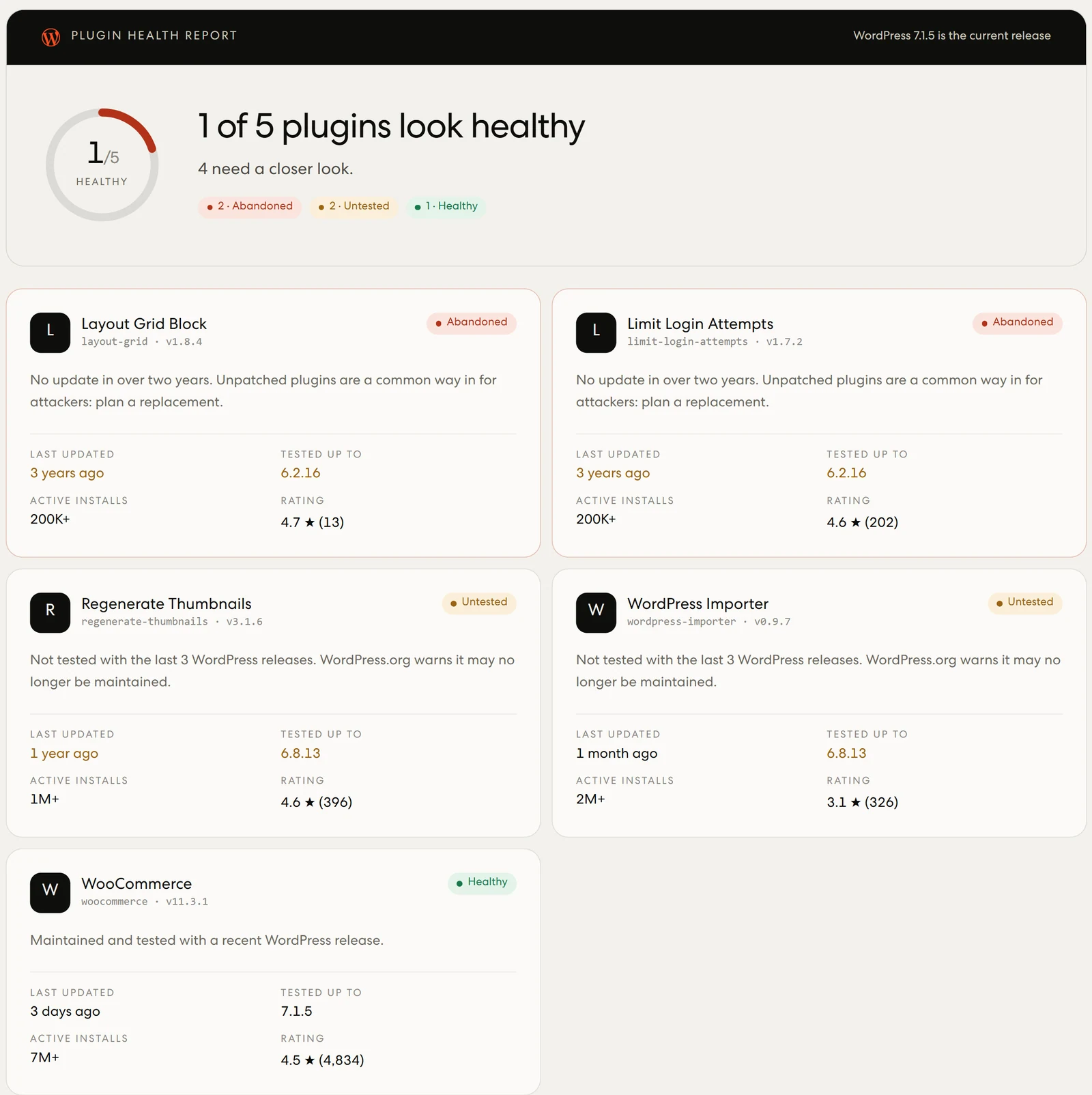
- List every active plugin and check its last update and “Tested up to” version.
- Replace abandoned plugins first, starting with security, login and form plugins.
- For untested plugins, check the changelog and support forum before your next WordPress update.
- Remove plugins you no longer use; deactivated plugins can still be a risk.
- Run the check again every few months, because plugins can go quiet at any time.
Download the data
The full dataset is free to use with credit: all 1,000 plugins with installs, last update, “Tested up to”, PHP requirement, rating, support threads and the verdict for each. Download the CSV. If you write about these numbers, please link to this page as the source.
Method and limitations
- Source: the public WordPress.org plugin API, sorted by popularity (active installs), collected on November 23, 2026.
- Rules: abandoned means no update in over 730 days; untested means “Tested up to” three or more releases behind WordPress 7.1; stale means no update in over 365 days. A plugin gets the first rule it meets.
- Installs are minimums: WordPress.org reports bands such as “200,000+”, so install totals are lower bounds.
- Closed plugins are not included: plugins removed from the directory no longer appear in the popular list.
- Premium plugins are not included: only plugins listed on WordPress.org are covered.
WordPress plugin questions
How do I know if a WordPress plugin is abandoned?
Check its WordPress.org page for the last update and the “Tested up to” version. No update in two years, or testing three or more WordPress releases behind, are the two clearest signs. Unanswered support threads are a third. Our free checker shows all of this for every plugin on a site.
Is it safe to use a WordPress plugin that hasn’t been updated in a year?
It can be, if the plugin is small and does one simple thing. But no updates means no fixes if a security problem is found. Treat a year without updates as a reason to look for a maintained alternative, and two years as a reason to replace it.
What does “Tested up to” mean for a WordPress plugin?
It is the latest WordPress version the developer says they tested the plugin with. WordPress.org warns visitors when it is three or more releases behind. A plugin can still work on newer WordPress, but nobody has confirmed it.
How many of the most popular WordPress plugins are outdated?
In our November 2026 study of the 1,000 most-installed WordPress.org plugins, 8.1% needed attention: 3.7% had no update in over two years and 4.3% were three or more releases behind. Plugins with fewer installs were affected more often.
Want someone to keep your plugins in order? Our WordPress development team updates, replaces and tests plugins for you, so your site never depends on code nobody maintains.
Related serviceWordPress DevelopmentCustom themes, plugins and WooCommerce, built lean. Written byMuhammad AhmadFounder & Software Engineer at StackStead Solutions. Building for the web since 2020.Ask a question