When Moodle emails stop arriving, the cause is almost always one of four things: Moodle is not set up to send through a real mail service, the sending domain fails SPF or DKIM checks, cron is not running, or a setting is blocking mail on purpose. Check them in that order, then prove the fix with a real message, not the settings page.
We went through exactly this on the Digital Twin Leaders Moodle, where chapter notifications needed to reach learners reliably. This guide covers how Moodle sends email, where it breaks, and the checks we run before calling a Moodle email problem fixed.
How Moodle sends email
Moodle doesn’t deliver email itself. It hands each message to a mail server, either the web server’s own mail program or an SMTP service you configure, and that server delivers it to the recipient. Along the way, the recipient’s provider (Gmail, Outlook, Yahoo) checks whether the message really comes from the domain it claims, and decides between the inbox, spam or rejection.
Many Moodle emails, including forum posts, digests and most notifications, are sent by scheduled and ad hoc tasks. That means a broken cron job looks exactly like a broken mail server: nothing goes out, and nothing in the browser tells you why.
Why Moodle emails go to spam or never arrive
- No real mail service. Mail sent straight from a web server is often blocked or filtered, because web servers rarely have a sending reputation or authentication.
- SPF or DKIM fails. Since February 2024, Gmail and Yahoo require senders to authenticate. Unauthenticated mail from your domain is rejected or sent to spam.
- The no-reply address is on a domain you don’t authenticate. If Moodle sends “from” a domain your mail service can’t sign for, receivers treat it as spoofing.
- Cron isn’t running. Queued messages never leave Moodle.
- A setting blocks mail on purpose. A copied development config can stop or divert all email, and users past the bounce limit stop receiving mail.
How to configure SMTP in Moodle
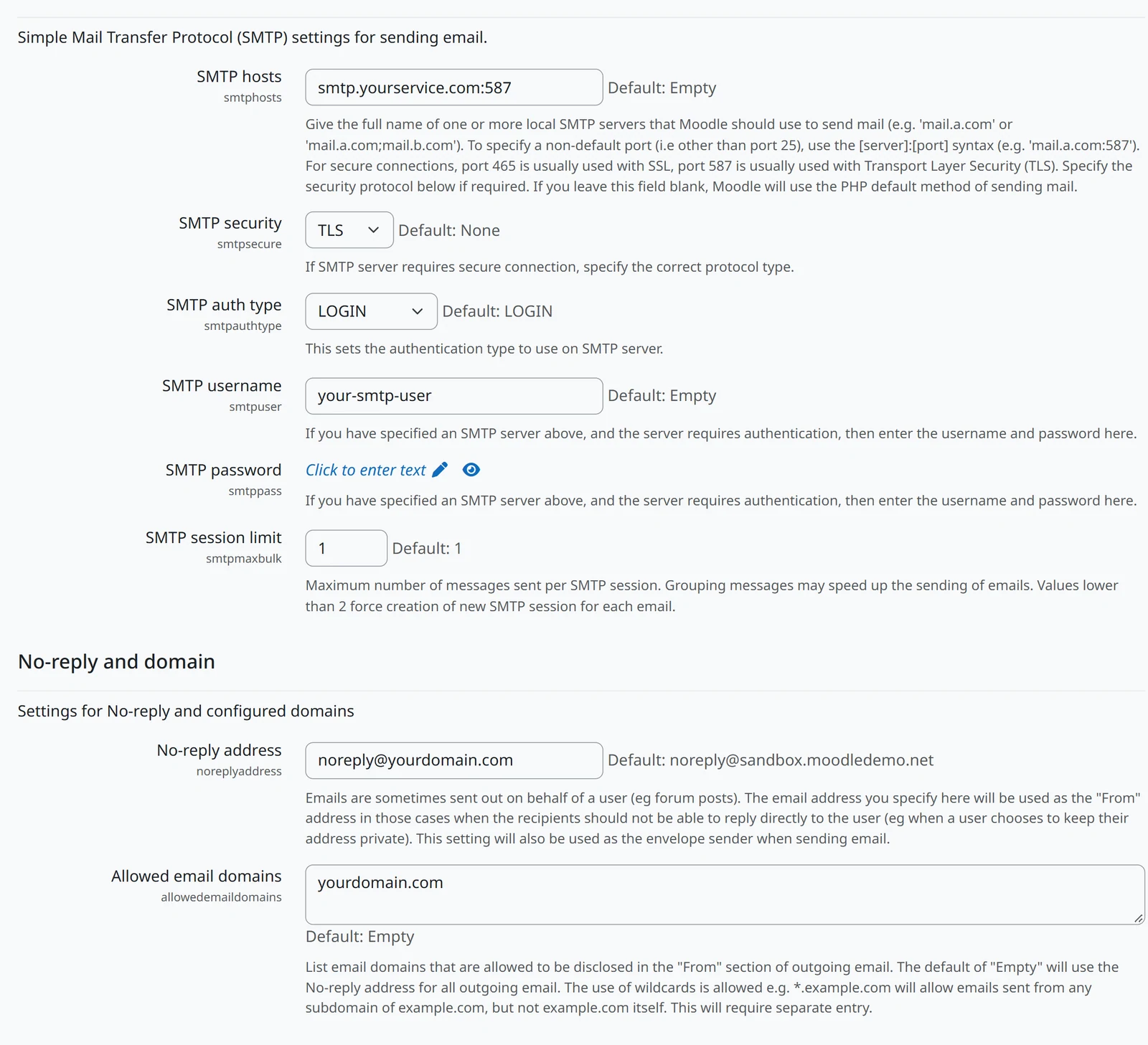
Use a transactional email service (for example Zoho ZeptoMail, Amazon SES, Postmark or your organization’s Microsoft 365 or Google Workspace relay) and point Moodle at it. In Moodle, go to Site administration › Server › Email › Outgoing mail configuration:
- 1.SMTP hosts: the service’s host and port, for example `smtp.yourservice.com:587`.
- 2.SMTP security: TLS for port 587, SSL for port 465.
- 3.SMTP Auth Type: LOGIN or PLAIN for a username and password, or XOAUTH2 where your provider requires it.
- 4.SMTP username and password: the credentials the service gives you for this sender.
- 5.No-reply address: an address on a domain the service is verified to send for, such as `noreply@yourdomain.com`.
- 6.Allowed email domains: list your own domains, so Moodle only sends “from” addresses it is allowed to use.
Set up SPF, DKIM and DMARC for your Moodle domain
These three DNS records tell receivers your Moodle email is genuine. Your mail service shows the exact values when you verify the sending domain.
| Record | What it proves | Where it lives |
|---|---|---|
| SPF | Which servers may send for your domain | One TXT record on the domain, listing your mail service |
| DKIM | The message was signed by your domain and not changed | A TXT record at the selector your mail service gives you |
| DMARC | What receivers should do when SPF or DKIM fails | A TXT record at `_dmarc.yourdomain.com` |
Start DMARC with `p=none` so nothing is blocked while you check reports, then move to `quarantine` once SPF and DKIM pass for every message you send. Many services also ask you to verify a bounce or return-path domain; do it, because it makes SPF line up with your domain.
Moodle password reset and notification emails not arriving
If some emails arrive and others don’t, the problem is usually inside Moodle rather than with the mail service:
- Check cron. In Site administration › Server › Tasks, look at when scheduled tasks last ran. If nothing ran recently, fix cron first.
- Check message outputs. In Site administration › General › Messaging › Notification settings, make sure email is enabled for the notifications you expect.
- Check the user. A user’s own notification preferences can turn email off, and users over the bounce threshold stop receiving mail.
- Check config.php. `$CFG->noemailever` stops all mail and `$CFG->divertallemailsto` sends everything to one address. Both are common in copied test setups.
Test Moodle outgoing mail properly
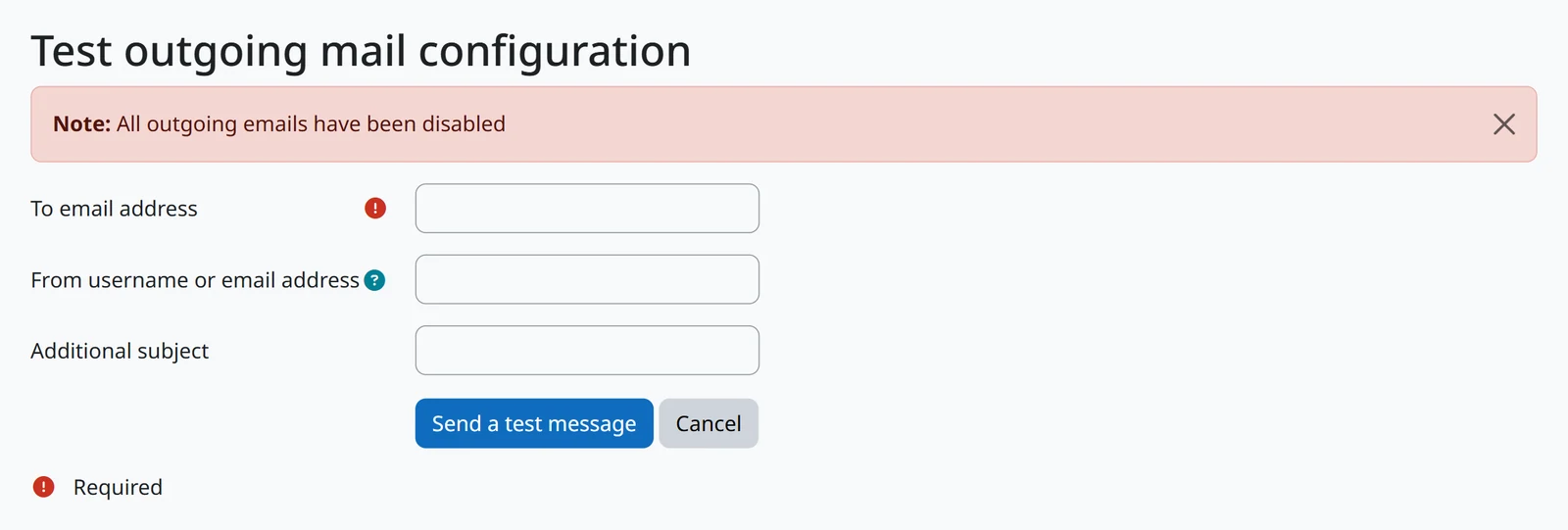
Saving the settings proves nothing. Send a test from Site administration › Server › Email › Test outgoing mail configuration. If it fails, turn on Debug email sending under Site administration › Development › Debugging and try again to see the SMTP conversation.
- A test email reaches a Gmail address and an Outlook address, in the inbox.
- The message headers show SPF pass, DKIM pass and DMARC pass for your domain.
- A real Moodle notification (a forum post or an assignment notice) arrives, not only the test.
- Cron runs every minute, and the scheduled tasks page shows recent runs.
- The no-reply address is on a domain your mail service is verified for.
- Development settings such as noemailever or divertallemailsto are gone from config.php.
For Digital Twin Leaders we moved outgoing mail to Zoho ZeptoMail over authenticated SMTP with TLS, verified the sending domain with its DKIM and bounce-domain records, then sent a real chapter notification and confirmed it arrived. We also repaired the RemUI email template, whose social icons were broken. The case study covers the full project.
Moodle email questions
Why does Moodle say the test email was sent, but nothing arrives?
Moodle only reports that the mail server accepted the message. The receiving provider can still reject it or file it as spam, usually because SPF or DKIM fails. Check the spam folder and the message headers, then fix the DNS records.
Which port should Moodle use for SMTP?
Port 587 with TLS is the common choice. Port 465 with SSL also works where your service supports it. Port 25 is often blocked by hosting providers and is best avoided.
Can I send Moodle email through Gmail or Microsoft 365?
Yes, with an SMTP relay or OAuth2 sign-in that your provider supports, but sending limits are low for large sites. A transactional email service handles bulk course notifications better.
Do I need DKIM if I already have SPF?
Yes. Gmail and Yahoo expect both, and DKIM survives forwarding where SPF often fails. With both in place, add a DMARC record so receivers know your policy.
If your Moodle email still won’t behave, our Moodle support and maintenance team can trace it end to end, from cron and settings to DNS and the inbox.
Related serviceMoodle SupportUpdates, backups, monitoring and developer hours. Written byMuhammad AhmadFounder & Software Engineer at StackStead Solutions. Building for the web since 2020.Ask a question