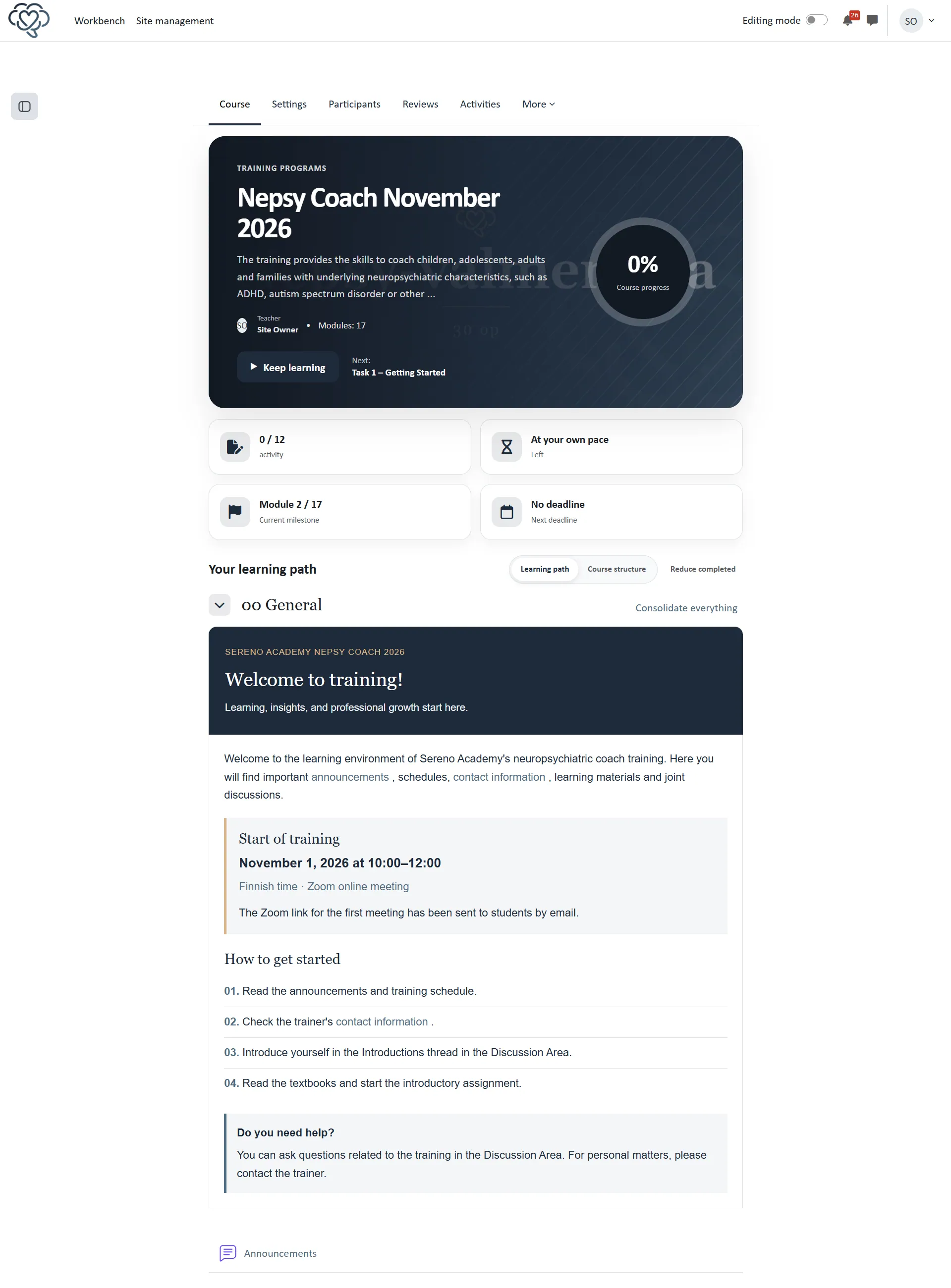
Finnish training, structured in Moodle.
Moodle course development for Sereno Akatemia: we turned lectures, slides and worksheets into clear courses for Finnish health and social care professionals, with embedded Vimeo lectures and private, multi-file assignments.
Sereno Akatemia trains Finnish social care, health care and education professionals in remote programs such as neuropsychiatric coaching and brief therapy. We built its Moodle courses at kurssit.sereno.fi: a 21-lecture brief-therapy course with 18 embedded Vimeo lectures, one consistent course-page style, and 21 private assignments that accept up to 10 files with no unintended deadlines, tested as a student before handover.
A full training program, arriving as a pile of files.
Sereno Akatemia is the training arm of Sereno, a Finnish provider of psychology services, assessments and therapy for autism spectrum and ADHD. Its remote programs train professionals as neuropsychiatric coaches (Nepsy-valmentaja) and brief therapists (Nepsy-lyhytterapeutti), alongside a SOTE (Finnish health and social care) entrepreneurship course. The material arrived as recorded lectures, slides, PDFs, worksheets, templates and written tasks. Organizing it needed consistent naming, clear navigation and practical submission settings, and two problems had to go: videos opening on unrelated pages, and assignment settings that stopped learners uploading the documents they needed. The goal was not a generic demonstration site but an LMS configured around Sereno Akatemia’s real teaching and the everyday actions of its students and instructors.
A course built around the learning sequence, not the file list.
We structured each course the way it is taught: an introduction, the lectures in order, and dedicated areas for practice exercises, supervision, written work and key documents. The Nepsy-lyhytterapeutti course alone has 21 lecture sections. Inside each, the slides, worksheets, video and assignment for that lecture sit together, so students always know what to watch, what to download and where to submit, and instructors have a predictable place for new material.
Vimeo lectures that play inside the lesson, not on another site.
Video is the core of these courses. We embedded the client’s Vimeo recordings directly in Moodle’s text and media areas, so learners watch each lecture beside its title and materials instead of leaving Moodle unnecessarily. For Nepsy-lyhytterapeutti we embedded the 18 recordings available in the client’s Vimeo library during this phase, and worked with the client’s Vimeo privacy and domain-embed settings so they play on the course domain.
- Responsive Vimeo players in a 16:9 container inside each lecture section.
- A consistent Finnish-language title and course identity beneath each recording.
- A branded visual treatment matching Sereno Akatemia’s course pages.
- Practical checks that every embedded recording displays and plays in Moodle.
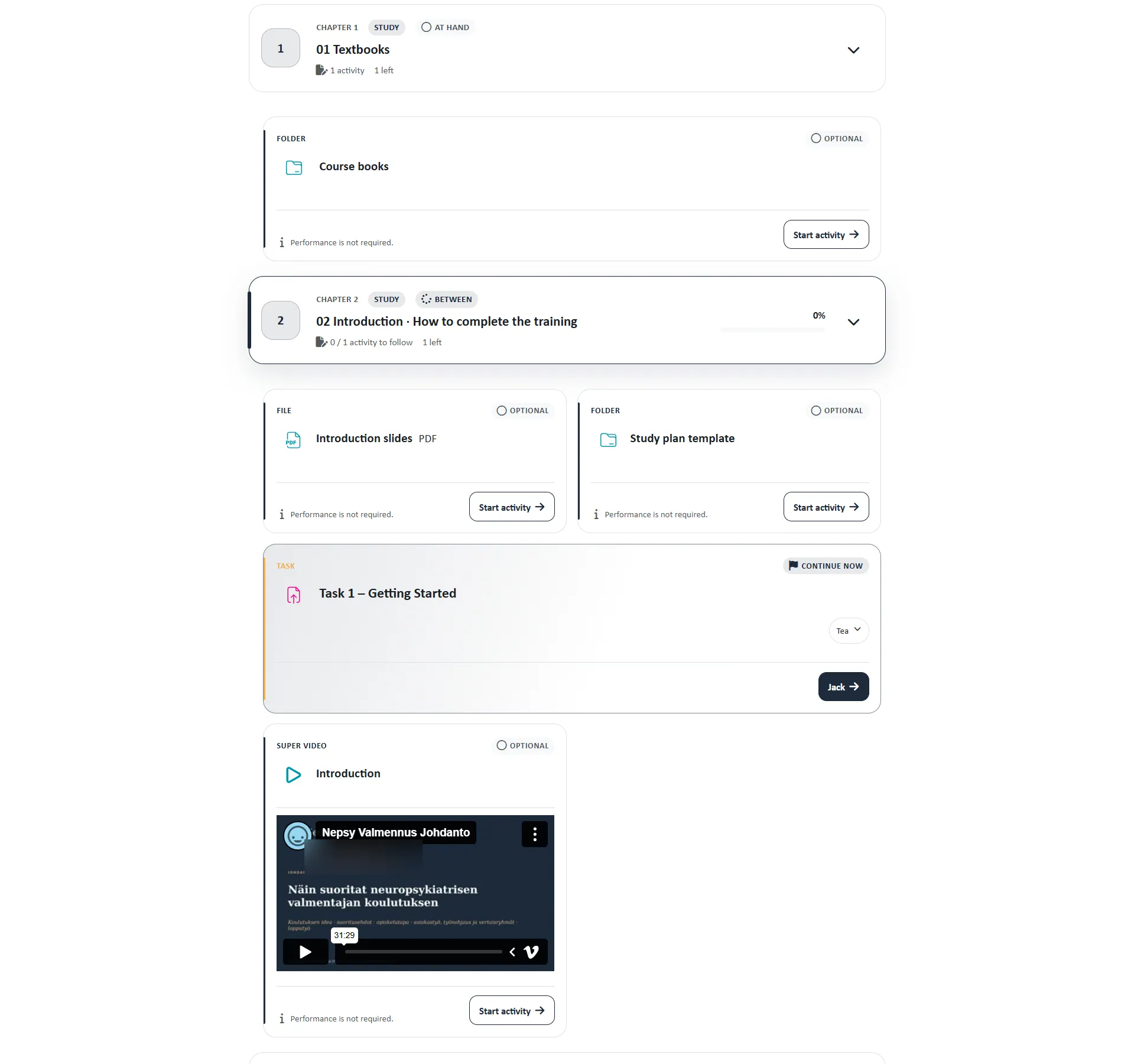
One clear course style, on a standard Moodle theme.
Sereno’s Moodle runs the standard Boost theme, so we designed the experience at course level. Course pages share one visual system: dark navy (#1E2A3A), steel blue (#4F6C83), soft neutral backgrounds and restrained gold accents (#D9B788), with clear headings, generous spacing and card-style sections. The aim was usability, not decoration: a clear hierarchy tells students where to start, what to watch and where to submit, and new lessons automatically look like part of the same course.
Private, multi-file assignments without unintended deadlines.
Some exercises involve sensitive practice scenarios, so written work had to stay private. Every written task is an individual Moodle Assignment, not a shared forum or upload area, with file submissions, teacher grading and notifications. Nepsy-lyhytterapeutti has 21 lecture assignments, so consistent settings mattered. After client feedback we removed date restrictions that were blocking submissions in both Nepsy courses, raised the limit to 10 files per assignment, and used teacher-controlled resubmission for revised work. Moodle stores submitted documents inside the assignment workflow, and teachers are notified of new submissions with a link to the review page; standard notifications are not the same as emailing every submitted document as an attachment.
Practice templates kept separate from student work.
We organized handouts, assignment instructions and practical-work templates in the right sections, including a client privacy notice model and a brief-therapy agreement and consent model. Because practice work can involve confidential client information, the blank templates stay clearly separate from student submissions, in line with Sereno’s guidance that signed client paperwork never goes into Moodle and student work is anonymized.
Tested as a student, refined with the instructor.
Real teaching surfaces details a course builder can’t see. We worked through Vimeo playback, upload limits and submission availability, and changed the number of files per task at the client’s request. Before handover we checked submission windows, accepted file types, individual submission settings and notifications, then went through the courses with student accounts, including real uploads. Privacy and real email delivery need re-checking whenever account roles or notification settings change. The result is a predictable course workflow: students reach every material, submit several documents where needed and never hit an unintended date-based block.
The tools behind the courses.
The largest gains came from careful configuration of standard tools, not from adding plugins.
- Moodle LMS: course architecture, learning activities, assignments, permissions and completion settings.
- Vimeo: hosting and embedding the video lectures in course sections.
- HTML and inline CSS: responsive video containers and consistent course layouts.
- PDF and Microsoft Word resources: learning materials, worksheets and assignment templates.
- Moodle notification settings: teacher alerts and student-facing assignment workflows.
Three structured courses and a pattern for the next one.
Sereno Akatemia now has structured online learning spaces for its professional training: a 21-lecture Nepsy-lyhytterapeutti course plus supporting work on Nepsy-valmentaja and the SOTE entrepreneurship course. Highlights include a repeatable course-page style, 18 embedded Vimeo recordings, individual assignment workflows, multi-file submissions and the removal of unintended submission deadlines. This was an applied LMS project refined through instructor feedback, not a theme mock-up or a one-page demo.
What this project shows about Moodle course development.
A well-configured Moodle can support complex professional development programs without sending learners to a separate platform for every activity. The largest gains often come from careful course organization, reliable media embedding, correct assignment permissions and practical testing, not from extra plugins. For training organizations planning a new Moodle rollout or improving an existing course site, the same delivery approach works:
- Map the learning structure.
- Organize the materials around it.
- Configure submission and instructor workflows.
- Test as a learner.
- Refine the course from real feedback.
| Area | What we verified |
|---|---|
| Structure | Nepsy-lyhytterapeutti built with 21 lecture sections, plus supervision and written work. |
| Video | 18 Vimeo lectures embedded in responsive 16:9 players and checked for playback. |
| Assignments | 21 private, individual assignments; date blocks removed; 10 files per task. |
| Design | One reusable course-page style on the standard Boost theme. |
| Testing | Student-account walkthroughs, including real file uploads. |
Not included: Certificate automation and questionnaire integrations were discussed but not part of this delivery.
The platform.
Good questions.
Paste Vimeo’s full embed code into a Moodle text and media area, page or label, inside a responsive 16:9 container. For private videos, set Vimeo’s privacy to hide the video from Vimeo and add your Moodle domain to the allowed embed domains, then test playback, including in the Moodle mobile app.
Yes. Moodle Assignment has a “Maximum number of uploaded files” setting in its file submission options, alongside size and file-type limits. For Sereno Akatemia, the client asked us to raise it to 10 files per assignment.
No. Individual Moodle Assignment submissions are visible only to the student and users with grading rights. Still check permissions in the real course, especially with custom roles or plugins, and avoid forums or shared folders for sensitive written work.
Structure the course in teaching order, keep each lecture’s video, slides and task together, use one consistent visual style, configure assignments to match how you grade, and test every flow with a student account before launch. Sereno Akatemia’s 21-lecture course follows this pattern.
Yes. Moodle supports modules, learning resources, assignments, progress tracking and other training workflows. A specific certification or certificate workflow should be planned and validated separately for the institution’s requirements.
No. Standard Moodle notifications tell teachers that work was submitted and link to it in Moodle; they don’t attach the files. Emailing documents would need an extra workflow.
Read this first.
What we’ve written on this, from real projects.
Want something like Sereno Akatemia?
Three taps and your brief is half written. No email needed until you choose to send it.
What we did here.
The services behind this project, each with its own page.
Other case studies.
More projects we’ve built, each with the full story.